
Download SwiftCompare – Kostenloses Tool zum Datei‑Vergleich & Synchronisation für Windows, Mac, Android, iOS
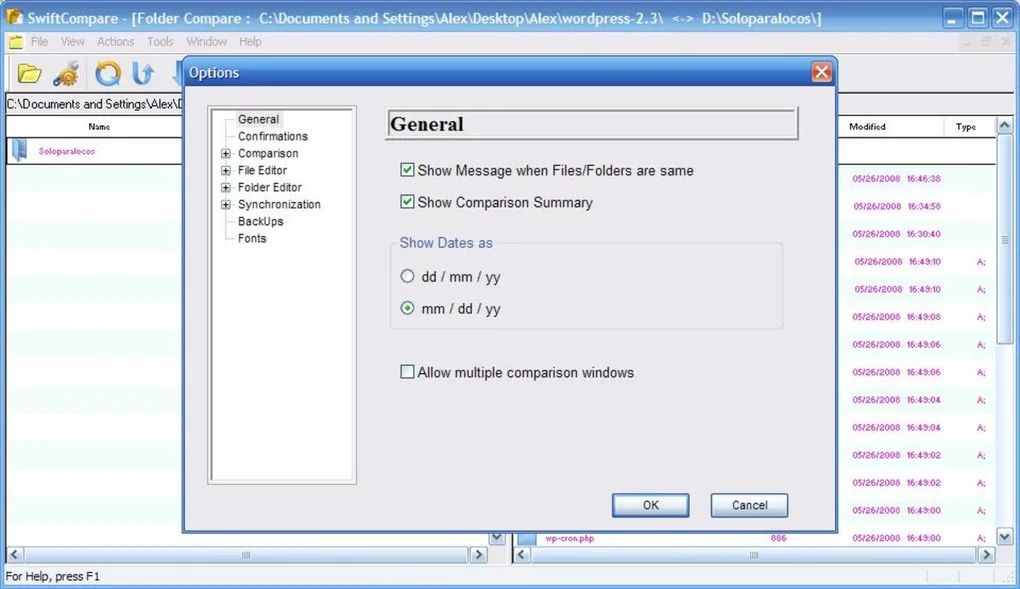
SwiftCompare ist ein leistungsstarkes und intuitives Software‑Tool, das entwickelt wurde, um den Datei‑Vergleich und die Synchronisation über Ihre Geräte hinweg zu vereinfachen. Egal, ob Sie Projektdaten verwalten, Dokumente sichern oder mehrere Ordner synchron halten, SwiftCompare liefert genaue, schnelle und sichere Ergebnisse. Mit seiner Dual‑Fenster‑Oberfläche können Benutzer Dateien, Ordner und ganze Verzeichnisstrukturen nebeneinander vergleichen.
Die Software hebt Unterschiede in Echtzeit hervor, einschließlich geänderter, fehlender oder doppelter Dateien, was die Identifizierung von Handlungsbedarf erleichtert. Nach einem Vergleich erstellt SwiftCompare einen detaillierten Zusammenfassungsbericht, der es den Benutzern ermöglicht, fundierte Entscheidungen darüber zu treffen, welche Dateien kopiert, gelöscht oder aktualisiert werden sollen. Das macht es zu einer idealen Lösung für Entwickler, Designer und alle, die regelmäßig mit großen Dateimengen arbeiten.
Das Tool unterstützt Batch‑Operationen, anpassbare Synchronisationsregeln und den sicheren Umgang mit sensiblen Daten. Durch regelmäßige Updates und einen geringen Ressourcenverbrauch sorgt SwiftCompare für optimale Leistung auf Windows‑, Mac‑, Android‑ und iOS‑Plattformen.
Effortless File Comparison with a Smart Dual-Window Interface
SwiftCompare steht im Vergleich zu anderen Dateiverwaltungstools dank seines intelligenten Dual‑Fenster‑Layouts heraus, das eine klare, nebeneinander‑Ansicht der zu vergleichenden Dateien und Ordner bietet. Dieser visuelle Ansatz reduziert das Risiko menschlicher Fehler erheblich und streamlinet den Prozess der Identifizierung von Diskrepanzen. Egal, ob Sie zwei Versionen eines Dokuments vergleichen, Ordner zwischen Laptop und externem Laufwerk synchronisieren oder Backups überprüfen, SwiftCompare macht es einfach, Änderungen auf einen Blick zu erkennen. Die Oberfläche ist sauber, responsiv und intuitiv – keine technische Expertise erforderlich. Sie können schnell durch Verzeichnisse navigieren, Dateien nach Typ, Größe oder Datum filtern und sogar Dateiinhalte direkt in der App vorschauen. Ein herausragendes Merkmal ist die Echtzeit‑Vergleichs‑Engine. Sobald Sie zwei Ordner oder Dateien auswählen, beginnt SwiftCompare, deren Inhalte zu analysieren und prüft Unterschiede in Dateinamen, Größen, Zeitstempeln und sogar Inhalts‑Hashes. Das stellt sicher, dass selbst wenn zwei Dateien denselben Namen und dieselbe Größe haben, aber unterschiedliche Inhalte, als verschieden markiert werden. Dieses Präzisionsniveau ist für Entwickler, die Code‑Änderungen nachverfolgen, oder für Teams, die kollaborative Projekte managen, von unschätzbarem Wert. Die Software unterstützt zudem tiefe Ordnervergleiche, das heißt, sie kann Unterverzeichnisse rekursiv scannen und eine hierarchische Aufschlüsselung der Unterschiede präsentieren. Das macht sie perfekt für die Synchronisation komplexer Projektstrukturen, ohne eine einzige Datei zu übersehen. Mit SwiftCompare vergleichen Sie nicht nur Dateien – Sie erhalten vollständige Transparenz über die Integrität Ihrer Daten.Smart Synchronization & Advanced Management Features
Beyond comparison, SwiftCompare excels in automated synchronization, offering users a range of options to keep their files up to date across devices. After a comparison, the tool presents a comprehensive summary of all discrepancies, allowing you to choose from multiple sync actions: copy new files, update modified files, delete outdated ones, or even create a backup of changes before applying them. This flexibility ensures that you maintain full control over your data, preventing accidental overwrites or deletions. You can also set up custom synchronization rules based on file type, size, or date—ideal for organizing media libraries, project backups, or document archives. The software supports batch processing, which means you can compare and sync multiple folder pairs in a single session, saving valuable time. For frequent users, SwiftCompare includes a scheduling feature that allows automatic comparisons at set intervals—perfect for maintaining real-time sync between work and home folders. Additionally, the tool integrates seamlessly with cloud storage services like Google Drive, Dropbox, and OneDrive, enabling cross-platform synchronization without manual intervention. Security is also a top priority: SwiftCompare uses encrypted temporary files and does not store your data on remote servers. All operations are performed locally, ensuring your sensitive information remains private. With regular updates that improve performance and add new features, SwiftCompare continues to evolve as a trusted tool for modern digital workflows.Compatibility, Installation, and Usage Guide
SwiftCompare is designed for maximum accessibility, supporting all major operating systems including Windows (7 and later), macOS (10.13 and above), Android (6.0+), and iOS (12.0+). Whether you're using a desktop, laptop, tablet, or smartphone, you can download and install SwiftCompare with just a few clicks. The installation process is straightforward: simply visit the official website, select your platform, download the installer, and follow the on-screen instructions. The app is lightweight, consuming minimal system resources, so it won’t slow down your device—even when comparing large folders. Once installed, launching SwiftCompare opens the dual-window interface where you can browse and select the folders or files you want to compare. Use the built-in search function to locate specific files quickly, or drag and drop folders directly into the comparison windows. After selecting the items, click “Compare” to initiate the scan. The results appear instantly, categorized into “Identical,” “Modified,” “New,” and “Missing” files. From there, you can review the list, preview changes, and apply sync actions with a single click. For advanced users, the settings menu allows customization of comparison criteria, sync preferences, and logging options. SwiftCompare also supports command-line execution for automation in scripts or batch files, making it a versatile tool for IT professionals and power users.Pros and Cons: Is SwiftCompare Right for You?
- Pros:
- Intuitive dual-window interface for easy side-by-side comparison
- High-precision file comparison using content hashing and timestamps
- Flexible synchronization options with customizable rules
- Supports batch processing and scheduled syncs for automation
- Lightweight and fast, with low system resource usage
- Secure local processing with no data stored on servers
- Available for Windows, Mac, Android, and iOS
- Regular free updates with new features and bug fixes
- Cons:
- Limited advanced features compared to enterprise-grade tools
- No built-in cloud backup integration (though it works with cloud folders)
- Free version lacks automated sync scheduling (available in Pro)
- Minimal documentation for beginners
- Mobile version has fewer features than desktop counterparts
Frequently Asked Questions (FAQ)
How do I download SwiftCompare for free?
Visit the official SwiftCompare website and select your operating system (Windows, Mac, Android, or iOS). Click the “Download Free” button to get the latest version. The download is secure and virus-free.
Can SwiftCompare compare files on cloud storage?
Yes, SwiftCompare can compare files stored in cloud folders (like Google Drive or Dropbox) as long as they are synced locally to your device. The app doesn’t access cloud services directly but works with local copies.
Is SwiftCompare safe to use with sensitive data?
Absolutely. SwiftCompare performs all comparisons and syncs locally. No files are uploaded to external servers, and temporary files are encrypted and automatically deleted after use.
Does SwiftCompare support folder synchronization?
Yes, SwiftCompare excels at folder synchronization. You can sync entire directory structures, including subfolders, with options to update, copy, or delete files based on your preferences.
Can I use SwiftCompare on both my desktop and mobile device?
Yes, SwiftCompare is available for Windows, Mac, Android, and iOS. You can use it across multiple devices to keep your files consistent, though the mobile version has fewer advanced features.







